Beyz Coding Assistant: Setup and Use Guide
April 25, 2025(Last edited on: October 5, 2026)By Beyz Editorial Team
Quick answer
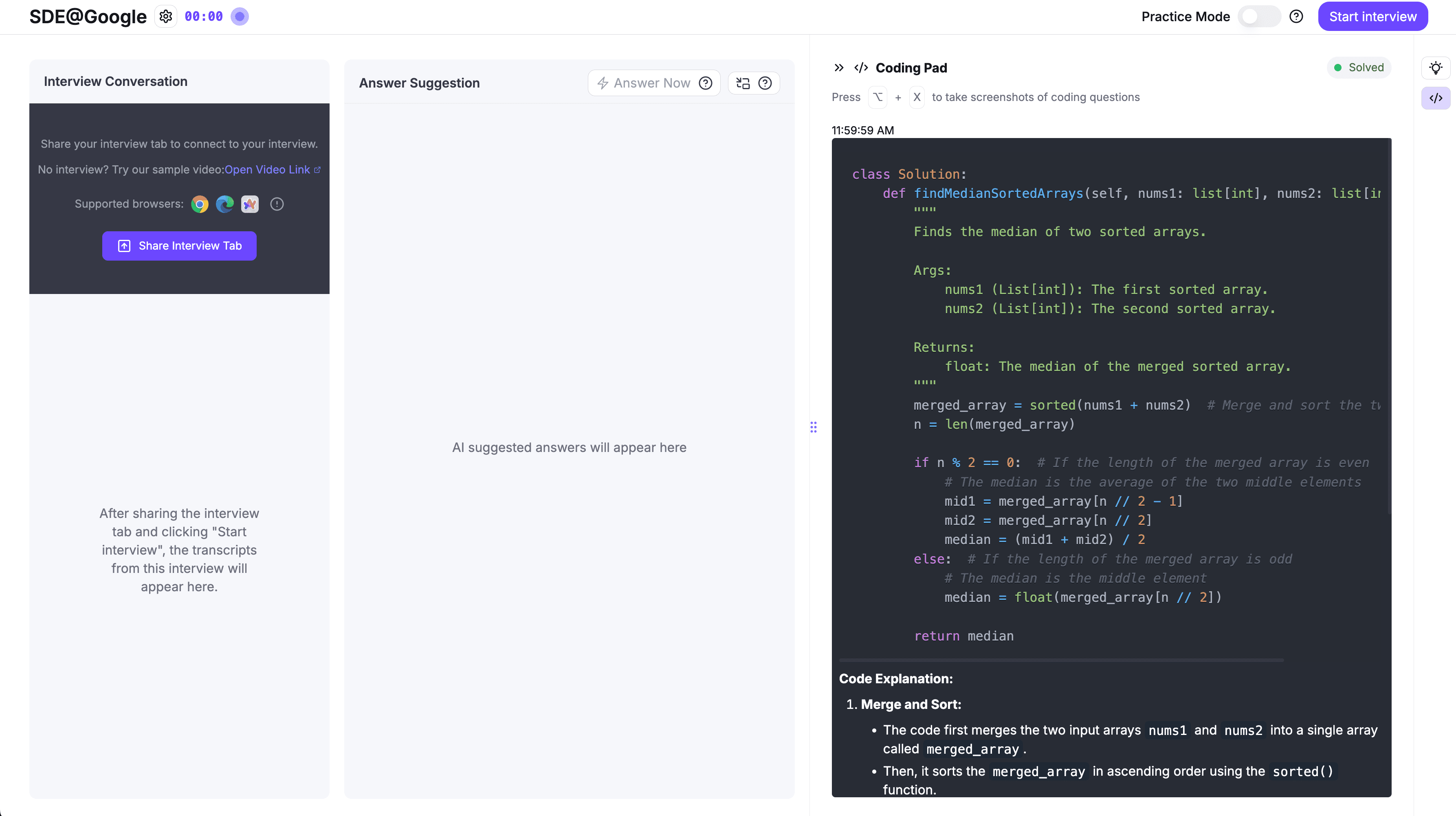
Install Beyz Invisible Desktop and Screen Solver, then choose how you want questions solved: Coder mode auto-detects new coding problems and answers them as they appear; Solver mode answers everything currently visible when you click Capture & Solve. The overlay floats above your IDE/browser and is invisible to screen sharing/recording according to Beyz (Invisible Desktop, Screen Solver). Beyz also advertises “crack coding questions instantly with one shortcut,” with breakdowns of logic and time/space complexity (coding assistant).
What you need
- A compatible computer: macOS 14+ or Windows 11 22H2+ (Invisible Desktop, Screen Solver).
- Beyz Invisible Desktop: floating, always‑on‑top overlay that stays invisible to screen sharing/recording per Beyz (Invisible Desktop).
- Beyz Screen Solver: solves on‑screen questions; Coder and Solver modes are included (Screen Solver).
- A plan that includes the Coding Assistant if you need full access. Beyz’s pricing page shows Coding Assistant support in Titan (semi‑annual) and God (quarterly) plans, while the Monthly plan lists Coding Assistant “Not Supported” (pricing).
Step-by-step setup
1) Install Invisible Desktop (overlay and controls)
- Download the app for Mac or Windows (Invisible Desktop). Beyz notes it’s a native overlay that remains on top of Zoom, Meet, Teams, your IDE, etc., and is invisible to screen recording and screen sharing (Invisible Desktop).
- Learn the global shortcuts so you can manage the overlay while you work:
- Click‑through mode: ⌥⇧P — lets your cursor interact with the app behind the overlay.
- Opacity: ⌥⇧↑/↓ — make the overlay more or less visible.
- Hide/summon: ⌥⇧H — toggle the overlay instantly.
- Scroll the code pad: ⌃⇧←/↑/↓/→ — navigate content without using the mouse. These controls are documented by Beyz (Invisible Desktop).
2) Install Screen Solver (coding‑question solving)
- Download Screen Solver for Mac/Windows (Screen Solver).
- Pick a mode:
- Coder mode: press Start once. Beyz says it watches your screen and automatically detects and solves each new coding problem as it appears—no extra hotkey or manual capture (Screen Solver).
- Solver mode: scroll to the questions you want answered and click Capture & Solve. Beyz states every visible question is answered in screen order; no repeats while you read (Screen Solver).
3) Open your coding page and begin
- Navigate to your preferred coding environment or problem set in your browser or IDE.
- Use Coder mode for hands‑free solving during drills; switch to Solver mode when you want a single pass of everything currently on screen. Per Beyz, the overlay stays on top yet out of your way, and remains undetectable to screen sharing/recording (Screen Solver, Invisible Desktop).
4) Read and manage results without breaking focus
- Adjust overlay opacity to glance at an idea, then fade it down while you type.
- Use click‑through to run code, set breakpoints, or submit solutions without moving the overlay (Invisible Desktop).
Choosing Coder vs Solver mode
- Use Coder mode when you’re cycling through many problems in sequence and want automated detection. Beyz describes it as proactive—solving before you ask (Screen Solver).
- Use Solver mode when you want a one‑click, controlled snapshot of exactly what’s on screen. Beyz notes it avoids repeats and stays quiet unless a genuinely new problem appears (Screen Solver).
For a deeper dive into when to pick each mode, see the Beyz guide: AI Coding Screen Solver: Choosing the Right Mode.
Privacy and detectability
According to Beyz:
- Screen Solver “never records video and never saves your screenshots.” A screenshot is used only to generate the current answer and then discarded. It asks for screen recording permission solely to read the on‑screen problem; no camera or microphone is used (Screen Solver).
- Shortcuts are intercepted at the system level so keystrokes don’t reach the interview tab or a proctoring app (Screen Solver).
- Invisible Desktop uses native OS content protection so screen sharing/recording tools see a blank spot where the overlay is (Invisible Desktop).
Plans and access
Beyz’s pricing page lists what includes Coding Assistant:
- Monthly plan: Coding Assistant “Not Supported.”
- Titan (semi‑annual) and God (quarterly) plans: Coding Assistant “Supported.” Check the latest details and any limits before you subscribe (pricing).
Practical workflow for coding interviews
Beyz advertises its Coding Assistant can break down logic, analyze time/space complexity, and craft solutions with “one shortcut” (coding assistant). To get the most from it in interview prep:
- Establish your own narration. After reading an idea, restate the approach out loud: the pattern, invariants, and complexity.
- Validate edge cases. Keep a short checklist next to you—null/empty, single element, duplicates, sorted/unsorted, negative/large values. A concise reminder can help you stress‑test ideas before coding.
- Dry‑run with a tiny example. Walk indices or pointers, then code only after the operations are clear.
- Timebox and iterate. If your first idea stalls, describe the back‑up approach and its trade‑offs, then implement.
Related how‑tos that pair well with this workflow:
- Coding Interview Edge-Case Checklist
- 24-Hour Coding Interview Cram Plan with Beyz
- LeetCode Assistant: Use AI as an Interview Coach
Troubleshooting and controls
- Overlay in the way? Toggle click‑through (⌥⇧P) to interact with the app behind it. Adjust opacity with ⌥⇧↑/↓, or hide/summon with ⌥⇧H (Invisible Desktop).
- Getting too many automatic answers? Switch from Coder to Solver mode to control captures, as Beyz says Solver mode answers once per visible question and stays quiet until something genuinely new appears (Screen Solver).
- OS not supported? Both apps require macOS 14+ or Windows 11 22H2+ per Beyz (Invisible Desktop, Screen Solver).
Example walkthrough (practice)
Labelled example. Say a classic array problem appears on your screen. In Solver mode, click Capture & Solve for a single pass. Skim the idea, then narrate your plan: choose a hash‑map lookup, aim for O(n) time/O(n) space, and verify with a two‑element counterexample. Only after the dry‑run do you code. This keeps you in control of the reasoning, not just the syntax.
FAQ
- Is this invisible during screen share? Beyz states both the overlay and Screen Solver remain undetectable to screen sharing and recording; Screen Solver also claims undetectability to proctoring apps (Invisible Desktop, Screen Solver).
- Are screenshots or video stored? Beyz says no. Screenshots are used once to generate the answer and then discarded; it does not record video, and no camera/microphone access is required for Screen Solver (Screen Solver).
- Do I need an account to try the overlay? Beyz’s Invisible Desktop download page says “No account required” (Invisible Desktop).
Next steps
- Start with Coder mode for high‑volume drills; switch to Solver mode for deliberate, one‑click passes (Screen Solver).
- Explore Beyz’s coding page for the one‑shortcut workflow and solution breakdowns (coding assistant).
- If you’ll rely on coding features, confirm your plan includes Coding Assistant (pricing).
Sources
- AI Interview Assistant | Beyz AI
- AI Screen Solver for Coding Questions | Beyz AI
- Beyz Invisible Desktop | Beyz AI