Beyz Phone Interview Assistant Setup Guide
August 2, 2025(Last edited on: October 4, 2026)By Beyz Editorial Team
The quick answer
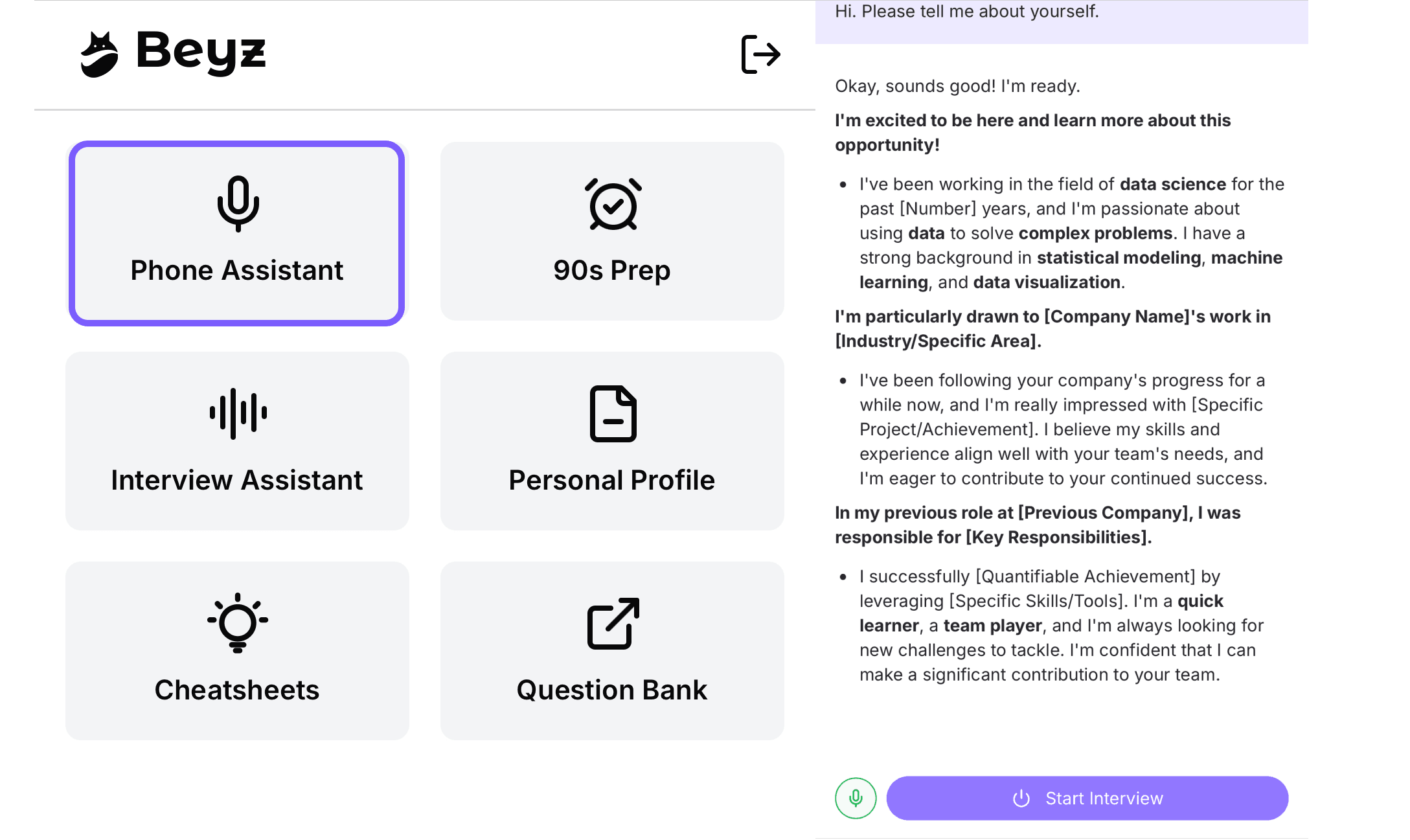
To use the beyz phone interview assistant effectively: 1) prepare your interview context in Beyz, 2) generate a concise role‑specific cheat sheet, 3) keep Beyz accessible on your phone during the call, 4) glance at real‑time suggestions and paraphrase them naturally, and 5) after the call, capture what worked. Beyz advertises real‑time interview suggestions and role‑specific cheat sheets you can use during live conversations Real‑Time AI Suggestions, Interview Cheat Sheets. If your interview is browser‑based with screen sharing, you can also run the Invisible Desktop app, which Beyz says floats above your apps and stays invisible to Zoom/Meet/Teams screen sharing and recording Invisible Desktop.
Before the call: prepare your assistant
1) Create or open your interview assistant
- Sign in and open the AI Interview Assistant. Beyz positions this as its core product for live interview help with real‑time suggestions tailored to your context AI Interview Assistant, Real‑Time AI Suggestions.
- Add the materials that establish context. Beyz’s plan table mentions “Custom File Uploads” (e.g., resume, additional files on some plans) Pricing, so attach your resume and any role‑relevant documents your plan allows.
2) Build a short, glanceable cheat sheet
- Generate a role‑specific cheat sheet with key stories, metrics, and frameworks. Beyz highlights this as a built‑in feature Interview Cheat Sheets.
- Keep it tight: 3–5 bullets per common topic (intro, biggest impact, tough trade‑off, conflict, failure/learning), plus a few metrics and acronyms you tend to forget.
- Want a deeper pattern to follow? See our practical walkthrough: AI Interview Cheat Sheet: Beyz Guide.
3) Do a quick rehearsal with the same context
- Run a 10–15 minute practice to hear and refine how your answers sound. Beyz offers a “Solo Practice” mode so you can train with the same context you’ll use in the interview Solo Practice.
- Tune phrasing until it feels like you. The goal is to internalize structure, not memorize lines.
4) Set up your phone for glance‑only use
- Put your phone on a simple stand at eye level next to your screen.
- Turn on Do Not Disturb and silence vibrations.
- Increase text size and contrast for easier glances.
During a phone interview (audio‑only)
-
Open your prepared assistant and cheat sheet on your phone so you can glance without scrolling much. Beyz emphasizes real‑time suggestions during interviews; use them as prompts and paraphrase in your own words Real‑Time AI Suggestions.
-
Use “buy‑time” phrases to read once, then answer:
- “Great question—let me give a focused example.”
- “Two parts here; I’ll start with the impact, then the trade‑offs.”
-
Speak naturally. Keep 1–2 bullets in working memory and deliver conversationally. Avoid reading verbatim.
-
Close loops. If a hint surfaces a metric or risk you missed, say, “One more detail on impact…” and add it succinctly.
-
Stay honest. Use prompts for structure and recall, not to fabricate experiences.
Tip for non‑native speakers: Beyz states it supports 10+ languages and real‑time translation across multiple languages AI Interview Assistant. If your interviewer switches languages or accents, that capability may help your preparation, but always align with the interview format.
During a browser‑based interview
If you are not sharing your screen
- Keep your phone assistant beside your monitor and glance as needed, same as a phone call. Maintain eye contact with the camera when speaking.
If you are sharing your screen
You have two safe ways to keep prompts off the shared view:
- Use your phone as the prompt surface (it stays off your computer screen).
- Or use Beyz Invisible Desktop. Beyz says the desktop app floats above any meeting or IDE and is “invisible to screen sharing and recording” for Zoom, Meet, Teams, OBS, QuickTime and more Invisible Desktop. If you prefer on‑computer prompts during a shared‑screen session, this is the Beyz‑recommended route.
Additional setup help for desktop use: Interview Copilot Desktop Controls Explained, and the quick checklist: Interview Copilot Desktop Setup Checklist.
Ethical and practical guidelines
- Follow the rules of your interview. Use prompts to stay organized and recall specifics, not to misrepresent skills or work.
- Keep it short. Prompts should nudge you toward your own, concise answer.
- Paraphrase everything. Your voice and phrasing matter more than a perfect line.
If you want a deeper dive on live‑use best practices, see: Real‑Time Interview Assistants: Setup, Workflows, and Best Practices and Will Interviewers Notice a Real‑Time Interview Assistant?.
After the call: capture and improve
- Jot 5 quick notes: best answer, missed detail, follow‑up you owe, one behavioral story to tighten, one technical explanation to clean up.
- Update your cheat sheet while memories are fresh for the next round.
- For regular work meetings, Beyz also offers a Meeting Assistant with real‑time teleprompter, transcription/translation, and summaries (topics, actions, questions) Meeting Assistant. Use this for team calls and client meetings; interview formats may have different expectations.
Plan and setup notes
- Beyz lists “Phone Assistant & Phone Interview” as a supported capability on its plans page AI Interview Assistant, Pricing. Review plan details to confirm file upload limits (e.g., resume‑only vs. additional files) before you prepare your context.
- If you’ll also face coding or system‑design rounds in the browser, explore desktop options in advance. Beyz’s Invisible Desktop app is available for Mac and Windows and is designed to remain invisible to screen sharing/recording, per Beyz’s description Invisible Desktop.
- Advanced configuration and context tips: Beyz Assistant Settings and Context Management.
A simple run‑of‑show you can copy
- T‑24 hours: Build or refresh your cheat sheet Interview Cheat Sheets. Do a quick Solo Practice run‑through Solo Practice.
- T‑30 minutes: Open your assistant on your phone, check DND, adjust text size, and place the phone on a stand.
- During: Use buy‑time phrases, glance once, paraphrase, and close loops.
- After: Write five notes, update the cheat sheet, and prepare any promised follow‑ups.
FAQ
Will interviewers see Beyz during a screen‑share?
If you keep prompts on your phone, they are off‑screen by default. If you prefer desktop prompts, Beyz says its Invisible Desktop overlay remains invisible to Zoom/Meet/Teams screen sharing and common screen recorders Invisible Desktop.
Can I rely on Beyz for real‑time suggestions?
Beyz markets real‑time interview suggestions tailored to your context Real‑Time AI Suggestions. Treat them as prompts to structure your own authentic answer.
Does Beyz support phone interviews specifically?
Beyz’s site and plan details reference a “Phone Assistant & Phone Interview” capability AI Interview Assistant, Pricing. Check your plan and prepare your context beforehand to get the most out of it.
Where to go next
- Start with the overview: Beyz AI
- Use real‑time suggestions: Real‑Time AI Suggestions
- Keep prompts off shared screens: Invisible Desktop
- Deep‑dive tutorials: Real‑Time Interview Assistants: Setup, Workflows, and Best Practices and Interview Teleprompter: Setup for Live Video Calls
Sources
- AI Interview Assistant | Beyz AI
- Real-Time Meeting Assistant | Beyz AI
- Beyz Invisible Desktop | Beyz AI